Chest Shops: Difference between revisions
Jump to navigation
Jump to search
Silverpg017 (talk | contribs) m Minor clarification |
Silverpg017 (talk | contribs) m Typo |
||
| Line 19: | Line 19: | ||
<pre>[Sell Shop] | <pre>[Sell Shop] | ||
Quantity | Quantity | ||
Price | |||
Item</pre> | Item</pre> | ||
Revision as of 18:59, 2 May 2026
Chest Shops is a feature in Pactoria that allows players to trade with other players through chests. It has two modes: Buy shops and sell shops.
Buy shops
Buy shops allow players to buy items from the chest shop. To create a buy shop, place your chest and add a sign with the following:
[Buy Shop]
Quantity
Price
Item
-
 Adding this text to the sign...
 -
 ...displays this chest shop.


Sell shops
Sell shops allow players to sell items from the chest shop. To create a sell shop, place your chest and add a sign with the following:
[Sell Shop]
Quantity
Price
Item
-
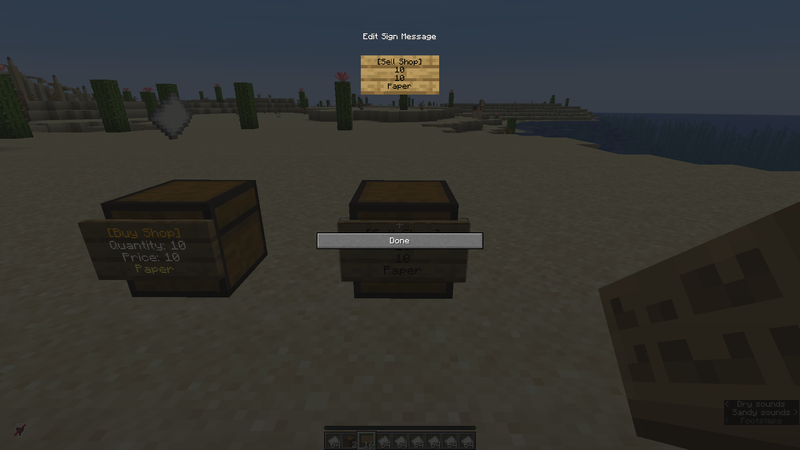 Adding this text to the sign...
 -
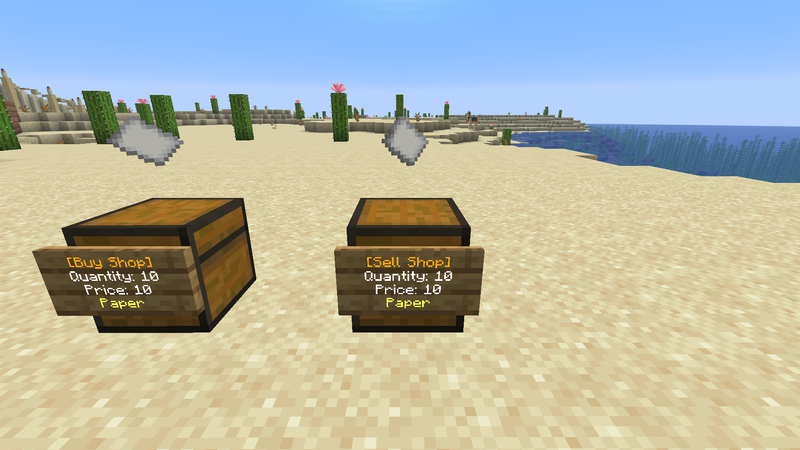 ...displays this chest shop.


Notes
For clarification, this is what each line in the chest sign must say:
- Quantity: The player must add an item amount. The range goes from 1 to 64. For example, if the shop owner wants to sell 64 diamonds, they would need to type
64. - Price: The player must add a fixed price (per quantity). The range goes from 0 to 2,147,483,647, and decimals can be added. Moreover, numerical notations like K (1,000) and M (1,000,000) can be added. For example, the shop owner can type the price as
3.14Kand it will turn into3,140. - Item: By default (if this line is empty), the plugin will pick the first item in the chest as the product to be bought or sold. If you add an item yourself, simply type the item's name.